Capell home
Live demo
Open-source Laravel CMS built on Filament

Build the Laravel CMS once. Keep improving it.

Capell brings reusable page blueprints, real-theme preview, append-only Page history and validated recovery into the Laravel application you own.

Editors preview, publish and recover pages in Filament. Developers keep the public site in Blade, Livewire, Inertia, Vue.js or their own Laravel stack.

Semi-real 3D cutaway of the Capell workflow: a structured content record is edited in a calm admin workspace, composed into a page layout, and rendered across a clear boundary as a finished public website, with optional packages connected at the side. Core / Admin / Frontend
01 — Show it

Watch Capell build a page.

Real screenshots, not illustrations — the product as it looks in Filament today.

Scroll for the actual admin, not a mockup.

Define a page pattern once. Change every page that uses it.

Each part has one job. Start with a useful page body, add typed blocks or approved Layout Builder components when editors need composition, and keep bespoke Blade for pages that genuinely need it.

Page structure Define reusable page structure

Define shared page families, fields, layouts, and available widgets once. Use simple content, typed blocks, approved composition, or bespoke Blade according to the page, then improve shared structure in one place.

See how pages are put together
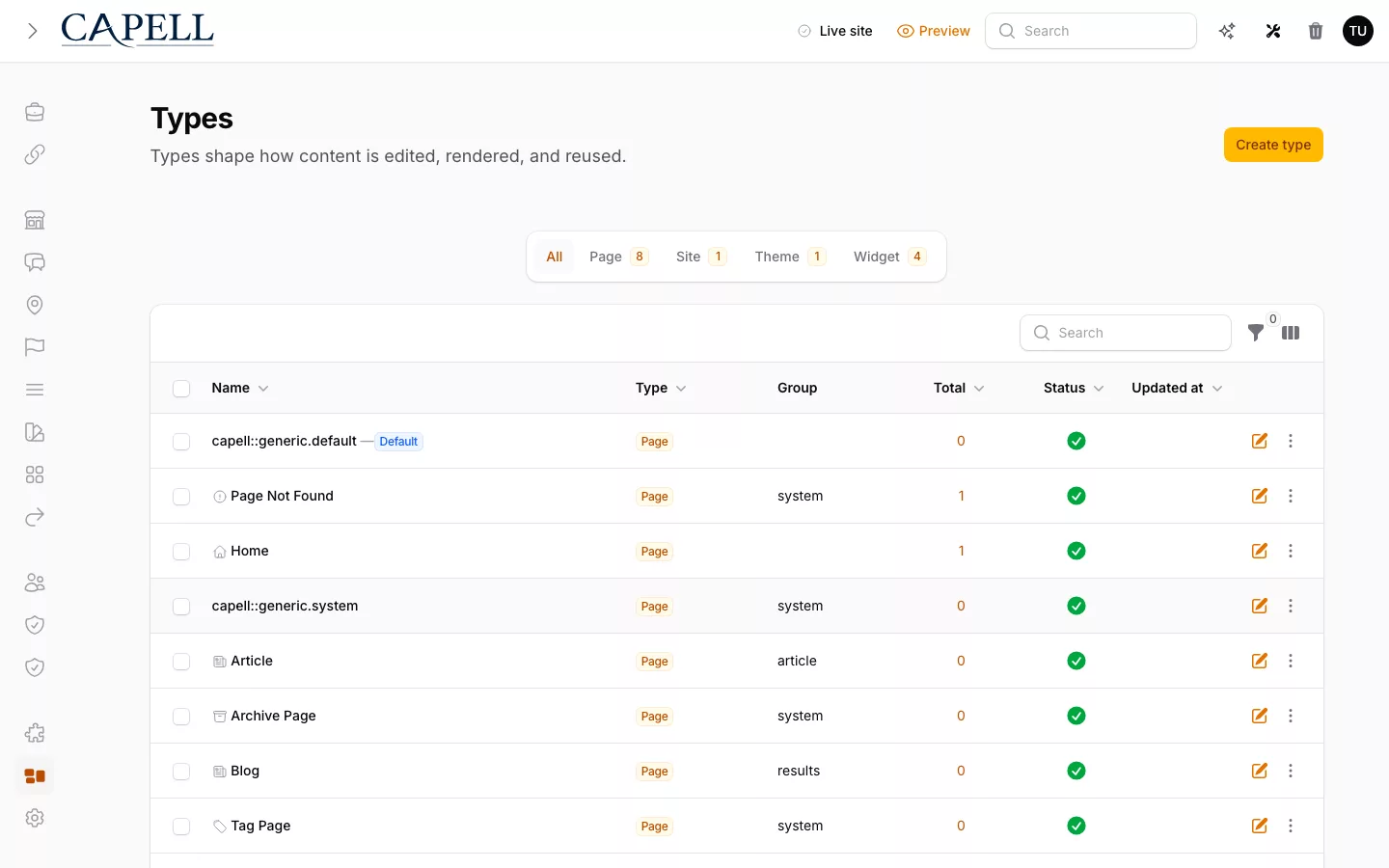
Home: actual Capell admin showing page types with their blueprints, layouts and counts.
Filament editing Editors work in the same Filament admin as the rest of the application

Editors find the page they need, fill in the fields its blueprint defines, preview the result through the real theme, and publish in the Filament panel the application already uses.

See the editor workflow
Home: actual Capell page editor for Blog showing its published URL, title and rich-content fields, publishing state, page context, blueprint and layout controls.
Public delivery Connect Capell to your rendering stack

Resolve the page, hydrate its content, and hand it to Blade, Livewire, Inertia, Vue, or your own frontend.

See the delivery boundary
A page record leaving a precise aperture in the navy system interior and arriving as a finished public page held in an application-owned frame, in daylight.
Real product workflow

Find → compose → check → measure → recover

Find the page and its shared structure

The populated content index keeps page hierarchy, publish status, update time, page type and PageSpeed state visible before an editor opens a record.

See content management

Compose approved page areas

Layout Builder keeps named Main and Sidebar areas, approved widgets, responsive preview and container settings together inside the Page editor.

Follow the editor workflow

Check the site before launch

Diagnostics brings site, language, theme, migration, queue and Tailwind checks into one pre-deployment view.

See production readiness

Preview and restore a Page revision

Page History previews the selected revision before rollback or roll-forward appends another recovery event and keeps the earlier timeline intact.

See Page history and recovery

Read site metrics at a glance

The native Filament metrics surface shipped in Core PR #370 turns registered site totals into compact cards with a daily trend, so an administrator can compare current state without a full-width report.

See the Core implementation

Capell product workflow screenshots

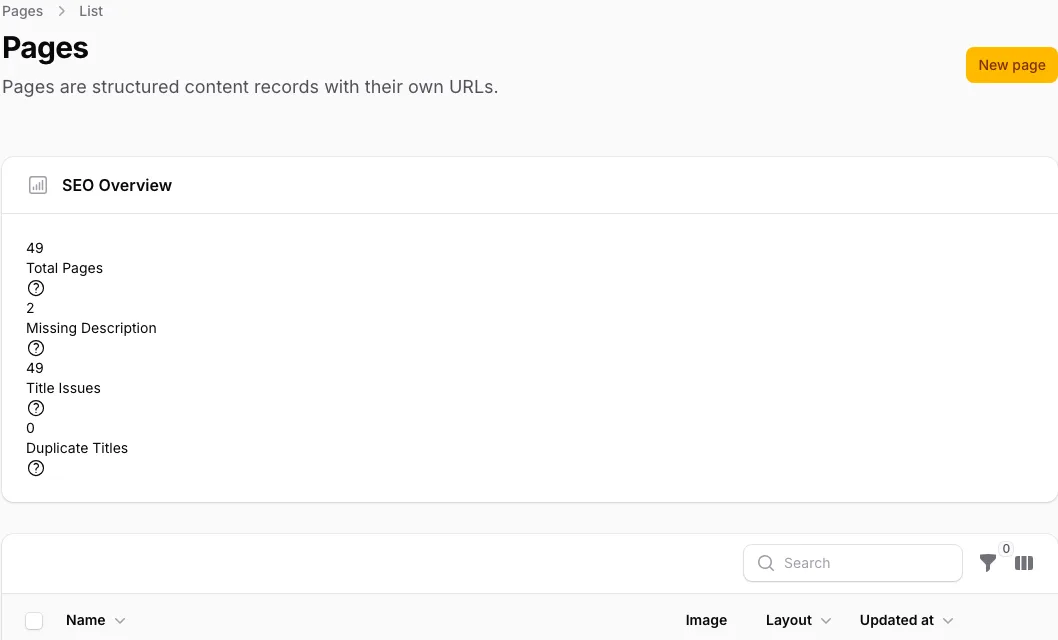
Home: actual Capell Pages index showing SEO Overview, publish status, update time, page type and PageSpeed columns for four seeded pages.

Abstract Capell Website Generator flow turning a business brief into structured pages, navigation, theme layers, reusable content and a private preview.
Capell Website Generator

A guided brief becomes an editable Capell site.

How it works: generation is automated and can take a couple of hours. Close the page if you like; Capell notifies you when your private preview is ready. Review the preview, request changes as a new version, or install it as a normal, editable Capell site that you own.

  • Guided brief
  • Private preview
  • Editable foundation

You can audit every claim on this page.

The clearest example is recovery. Every Page save appends one row to stored_events; Page History reads those rows, and rollback or roll-forward restores the latest full state at or before the chosen revision. This is the shape of that row, shortened for reading:

One Page save, one appended row
Show the appended row
stored_events
  aggregate_uuid     "9d2f6a44-…"          # one Page
  aggregate_version  14                     # the 14th recorded event for this Page
  event_class        PageRevisionRecorded
  event_properties   {
    "state": {
      "attributes":   { "name", "blueprint_id", "layout_id", "site_id", "parent_id", "meta", … },
      "translations": [ { "language_id", "title", "content", "meta" } ],
      "pageUrls":     [ { "url", "status_code", "type", "is_manual", … } ]
    }
  }
  created_at         "2026-07-31 09:14:02"

Representative row, shortened for reading. Rollback validates the target revision, then restores this state; the rows in between stay in place.

What time does to a page

Restoring is another save, not an undo.

Recovery validates the target revision, then appends the restored state as a new one. The history you came from stays exactly where it was.

  1. v12 published
  2. v13 content updated
  3. v14 content updated
  4. v15 layout changed
  5. v16 restored from v12

That is why rolling back is safe to do twice, and why rolling forward again costs nothing.

Boundary

Admin and public rendering don't share a dependency.

Core has no route back into Admin, so an authoring change can't reach the page a visitor sees.

Admin · Filament

Editors, previews, revisions, and package management.

render data blocked
Public · rendered output

Hydrated content only — no editor controls, field paths, or preview state.

The dependency runs one way: Frontend and the public request path never import Admin. A change on the authoring side literally cannot compile into the code that renders a visitor's page, so it only needs review for its own correctness, not for public safety.

Why Capell works differently

Capell gives repeated CMS work a standard place to live, includes the difficult editing and recovery paths, and stays open to normal Laravel extension.

See how it works
Which CMS features are already built?

Foundation ships previews, Page History, field-level comparison, and validated rollback and roll-forward, under the MIT licence. Recovery is append-only: every save is an event, so undoing a mistake never destroys what happened.

How does Foundation stay slim?

Core, Admin and Frontend live in separate packages with a one-way dependency: Core does not depend on Admin, so an admin-side change cannot silently alter what a visitor sees.

Will this still be maintainable in year five?

Page types make the blueprint the unit of change. Adding a field or tightening validation is an edit in one place with a visible blast radius, not a migration plus a search across every template that assumed the old shape.

03 — Extend it

Add exactly what the project needs.

Composer packages, reviewed and priced, added only when the project earns them.

Browse the marketplace, priced and reviewed.

Release trust

Read package impact before installation.

Check the exact release, data access, migrations, jobs, support and removal effect before a package changes the application.

Current release evidence combines automated checks, an independent boundary review and authorised approval. Use it alongside the package manifest and site-impact review; a catalogue badge is not a substitute for evaluating the application.

58 of 58 eligible first-party releases currently carry exact-release review evidence.

See the release standard
Capell's Page History screen in Filament, listing recorded revisions with their author, timestamp and restore action.
  1. Automated checks

    Tests, static analysis, dependency audits, manifest contracts, public-output safety and artifact hashes must pass.

    Automated
  2. Independent boundary review

    A second pass looks for missed interactions, weak boundaries and marketplace claims that the code does not support.

    AI-assisted
  3. Human approval for each release

    We resolve blocking findings before an authorised reviewer approves the exact package version.

    Human sign-off
Loading section
Loading section
Marketplace

Add search, forms and publishing workflow when the project earns them.

Add released capabilities only when the project earns the need for them. Each extension is a Laravel package the team can review, test, update and remove through the same workflow as the rest of the application.

Listings present buyer-facing metadata, derived capabilities, support, data access and readiness so the team can judge fit before installation. Approved marketplace releases are current install options; unlisted Labs work remains roadmap direction until its readiness has been assessed.

Three live examples show the range without turning the homepage into a catalogue. Browse every theme when one of these directions fits the project.

2 4
Homepage page in the theme-awards theme, screenshot 1

Awards

Numeric scores, segmented judging, winner-of-the-day, public votes — an awards scoreboard with the tension left in. May the best entry win.

Archive & directory
$29.00

Numeric scores, segmented judging, winner-of-the-day, public votes — an awards scoreboard with the tension left in. May the best entry win.

6 pages

Homepage page in the theme-brutalist theme, screenshot 1
Included default

Brutalist

Monospace type, stark links, visible focus rings, deliberately unpolished. A zine-grade archive for culture that lives outside the mainstream and distrusts gloss, with a Magazine Masthead preset for photographic editorial work.

Archive & directory
$29.00

Monospace type, stark links, visible focus rings, deliberately unpolished. A zine-grade archive for culture that lives outside the mainstream and distrusts gloss, with a Magazine Masthead preset for photographic editorial work.

6 pages

Homepage page in the theme-showreel theme, screenshot 1

Showreel

A digital-awards archive with motion previews, jury scores, and sharp media frames on muted grey. Every winner, every credit, every frame accounted for.

Archive & directory
$29.00

A digital-awards archive with motion previews, jury scores, and sharp media frames on muted grey. Every winner, every credit, every frame accounted for.

6 pages

View all 27 themes

Browse every available frontend direction in the full themes catalogue.

One central layered content structure connected by gold rails to several derived page arrangements, each composed from the same underlying plates in a different order.

One blueprint defines the fields. Every page of that type gets them.

Adding a field to a page type is a blueprint change, not a migration plus a rebuilt admin form plus a template edit. Editors get the field in Filament with its validation, existing pages keep their content, and the template decides whether to render it. Blueprints live in packages, so a page type can arrive from an extension and still be extended by the application.

  • Fields and validation
  • Layout options
  • Extended from packages
Free vs paid

Start with Foundation. Add a team workflow only when Pages need it.

Capell Foundation

£0

Install the stable 1.x Core, Admin, Frontend, Installer, and Marketplace releases from public Packagist packages without a purchase.

Install free

Publishing Studio

£59 / 12 months

Add a Pages-first workflow with reviewer assignment, approval, scheduled publishing, activity history and coordinated recovery. Paid checkout is not yet open; the package, its terms and its pricing are available to review now.

Review Publishing Studio
Custom build → Capell Foundation

Stop rebuilding the CMS around every project.

A Page model and Filament resource solve the first screen. Capell provides the preview, recovery, upgrade and extension contracts that keep returning.

Compare the custom work a Laravel team keeps owning with the maintained Foundation contracts Capell adds under the MIT licence.

Page families Custom Laravel and Filament build: Rebuild fields and templates each time. With Capell Foundation: One blueprint, every page of that type.
Custom Laravel and Filament build
Design fields, forms, URLs, redirects and templates again for every new page family.
With Capell Foundation
Define one blueprint and URL contract, then let the Laravel application render every page of that type.
Preview Custom Laravel and Filament build: A second rendering path that can drift. With Capell Foundation: Preview through the real theme, always.
Custom Laravel and Filament build
Build and maintain a second rendering path that can drift from the public site.
With Capell Foundation
Preview unsaved content through the application’s real theme and templates.
Recovery Custom Laravel and Filament build: Design revisions and restore from scratch. With Capell Foundation: Compare, validate, then roll back safely.
Custom Laravel and Filament build
Decide how revisions, comparison, conflicts and restore should work after an editor needs them.
With Capell Foundation
Compare any saved Page version, validate the target, then roll backward or forward without erasing history.
Upgrades Custom Laravel and Filament build: Maintain your own migration notes. With Capell Foundation: Repeatable installs with durable logs.
Custom Laravel and Filament build
Maintain project-specific migration notes, health checks and recovery steps.
With Capell Foundation
Run repeatable install and upgrade commands with durable logs, diagnostics and declared rollback rules.
Extension Custom Laravel and Filament build: Patch the CMS as the project grows. With Capell Foundation: Reviewed Composer packages, not core patches.
Custom Laravel and Filament build
Accumulate application glue or patch the CMS whenever the project grows.
With Capell Foundation
Add reviewed Composer packages through typed extension points instead of changing core.

Choose Capell when the CMS needs to grow with the application.

Weigh the real alternative, honestly: building it yourself against Capell and one other CMS shape.

Build a custom Filament resource when you only need a few editable records. Choose Statamic when you want the CMS to be the application. Choose Capell when a long-lived Laravel application needs reusable structure, controlled page composition, a Filament workspace, and a frontend the application team still owns.

Review why Capell made those trade-offs.

A few editable records
Capell
Partial or via add-ons Capell works, but it is more structure than a small admin needs.
Custom Filament
Built in Usually the simplest fit when the team can own the fields and resource.
Statamic
Partial or via add-ons A complete CMS may be unnecessary when content is incidental.
A growing Laravel CMS
Capell
Built in Shared pages, URLs, layouts, media, and extensions start from one model.
Custom Filament
Partial or via add-ons The team must design and maintain each CMS convention as requirements grow.
Statamic
Built in A strong fit when the CMS should provide the application's main conventions.
The admin editors use
Capell
Built in A Filament workspace connects structure, preview, publishing, and package tools.
Custom Filament
Partial or via add-ons The team builds exactly what editors need and owns every missing workflow.
Statamic
Built in Its own control panel provides the editorial experience.
Who builds the public site
Capell
Built in The Laravel application renders the public result with its chosen stack.
Custom Filament
Built in The team owns the frontend and all connections to the admin model.
Statamic
Partial or via add-ons The frontend is customisable within Statamic's application conventions.
  • ✓ Built in
  • ◐ Partial or via add-ons
  • — Not provided
  • Core · Package · Roadmap

Explore Capell in a real project before you install.

Open the live demo, follow the workflow, then install Capell Foundation when the fit is clear.

Check the editor experience, shared page structure, production-readiness tools, and public result against your own requirements.

Isometric still life of a modular stack of capability blocks beside an open lit doorway, with an editor interface panel standing alongside.
Loading footer