Strict public rendering for Laravel CMS sites
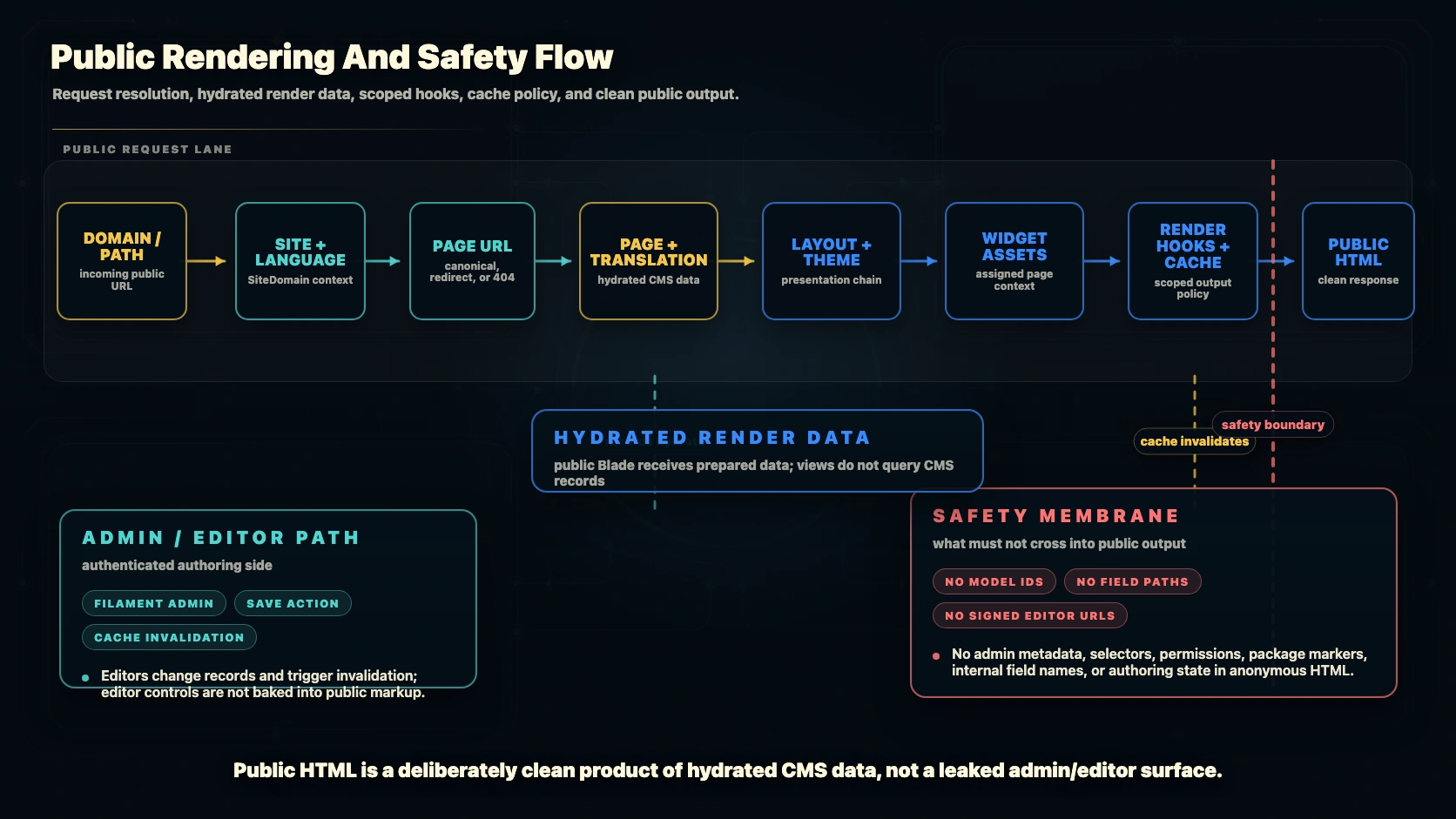
A CMS should not make public pages harder to trust. Capell treats public rendering as an engineering boundary: Blade receives prepared data, frontend output stays clean, and expensive or unsafe work is caught close to the code that introduced it.
The guardrails are strict enough to raise standards during development, but they are still Laravel configuration. Teams can run them as exceptions, collect logs, or disable a guard when a project needs a controlled escape hatch.
Public render guardrails protect the line between editing a page and visiting it. Visitors should get clean HTML, not admin controls, field paths, permissions, workspace state, package internals, or signed preview URLs.
Capell treats that line as part of the product contract. Editors work in Filament. Developers build widgets and themes. The public response still has to be visitor-safe, application-owned, and testable.
What to look for in a render review
- Only public content and public URLs appear in the HTML.
- Widget output is sanitized where editors can enter rich content.
- Package-provided output follows the same rules as first-party output.
- Caches and previews do not mix draft state with published pages.
This is one of the places where Capell should be strict. If the frontend is clean, visitors never need to know how the page was edited.
What the public view query guard protects
Public Blade should format render data, not discover it. If a view lazy-loads an Eloquent relationship or reads settings after the renderer starts, Capell can report the query, the page context, and the Blade file that triggered it.
Other Capell guardrails worth talking about
The same pattern appears across Capell: declare the contract, verify it with code, and keep a Laravel-owned escape hatch when the real project has an edge case.
Raise the standard without trapping the team
Strict defaults are useful only when they are understandable and controllable. Capell keeps the rule visible: fix the render boundary when the guard catches real lazy work, switch to logging when you need a broader audit, and turn it off deliberately when the project has a known exception.
What public render guardrails should prove
Capell public rendering should be strict where it protects visitors and maintainability. The useful proof is concrete: public Blade receives prepared data, avoids hidden queries, and renders clean visitor-safe output.
| Area | Capell shape | Developer check | Team outcome |
|---|---|---|---|
| Prepared data | Public views receive resolved content, links, media, and package contributions. | Load relationships and settings before rendering, not inside the view. | Rendering stays predictable and easier to cache. |
| Clean output | Visitor HTML should not include authoring state or internal implementation detail. | Assert public pages for clean output after adding widgets or packages. | Search engines and visitors see only the intended page. |
| Package contributions | Extensions declare render cost, cache behavior, and health expectations. | Review package output before trusting it on public routes. | Optional features can be added without weakening the render contract. |
| Debuggability | Local and test guardrails should point to the failing view or contribution. | Fix the preparation layer instead of suppressing the guard permanently. | Developers get a concrete repair path when a boundary breaks. |
Where public render work belongs
Resolve before rendering
Load page content, links, media, settings, and package contributions in the preparation layer. Views should format approved context instead of discovering data while HTML is being produced.
Developer experiencePass visitor-ready data
The frontend should receive copy, URLs, media, state labels, and presentation inputs that are safe for anonymous readers. Keep editorial workflow and operational controls on the management side of the boundary.
Security governanceReview package contributions
Extensions can add useful public capability, but their render cost, cache behavior, and visitor surface should be clear before they are trusted on production routes.
Package-led featuresVerify the final page
Use guardrails, smoke checks, cache checks, and link audits to prove the rendered page is clean and stable. Evidence beats confidence that a hidden boundary probably held.
Site operationsCapell learning journey
Step 3 of 7: Platform
Choose the platform area you need, then move through the sibling pages with next and previous controls.
Keep moving through Platform deep dives
Move through the platform pages as needed, then return to the main journey when the detail is enough.