
Capell
- Content in app
- Native
- Frontend control
- Native
- Package trust
- Native
- Operational health
- Native
Strong fit for CMS inside Laravel work.
Choose which optional cookies Capell may use.
Required for Capell to work — login, security, page rendering.
Anonymous usage telemetry to improve editor performance.
Personalization for the Capell marketing site.
Capell separates CMS responsibilities without separating the CMS from Laravel. Core owns the content model, Admin gives editors a Filament workspace, Frontend prepares public delivery, and packages add optional capability.
Start here when you need the whole shape before choosing a page type, writing a widget, installing a package, or planning a migration.
The platform map is the architectural walkthrough for Capell. It follows a page from CMS records to Filament editing to public rendering, then shows how packages, cache, search, SEO, deployment, and operations sit around that path.
Read it before choosing a page type, writing a widget, installing a package, or planning a migration. It is more technical than a marketing overview because the point is to see the shape the team will maintain.
For a serious evaluation, the boundaries matter more than the feature list. If the map feels heavier than your site needs, that is useful information. If it matches the work you expect to own for years, it is the right next read.
Capell is not trying to be every CMS. It fits when owners want lower rebuild risk, editors need guarded publishing, agencies need repeatable delivery, and developers want content, frontend rendering, extensions, and operations to stay inside the Laravel project.
Strong fit for CMS inside Laravel work.
Good start, but repeated CMS concerns become custom platform work.
Mature CMS, weaker fit when Laravel is the product boundary.
Strong API model, but the Laravel team rebuilds much of the site layer.


Follow the Capell CMS flow from Core records to Filament Admin, Frontend rendering, package extension points, cache, search, SEO, and public output safety.
Start with the practical question: what does the visitor or editor need to do next? Capell keeps that answer tied to the Laravel app, with shared structures for repeated pages and enough room for custom work when the project genuinely needs it.
Capell is not a detached content service. It gives Laravel teams a CMS layer that uses the same codebase, deployment habits, queues, policies, Blade views, tests, and operational checks as the rest of the product.
The project keeps deployment, tests, public views, permissions, cache policy, and operational checks in Laravel.
Core CMS records, Filament screens, Layout Builder, frontend resolution, and package extension points have a reusable shape.
Editors compose pages from structured records and approved sections without owning the frontend contract.
Avoid scattered CMS glue across plugins, detached APIs, and custom admin hacks.
Keep product code, publishing code, and operational checks close enough to test together.
The important boundary is deliberate: Core, Admin, Frontend, and Layout Builder provide the stable CMS path. Growth, publishing, search, commerce, operations, and AI capability arrive through focused packages when a site needs them.
The trusted Laravel and Filament ecosystem remains the bedrock.
The required CMS path from modelled content to editor screens and public delivery.
Specialist packages plug in when a project needs deeper workflow, discovery, access, analytics, or theme capability.
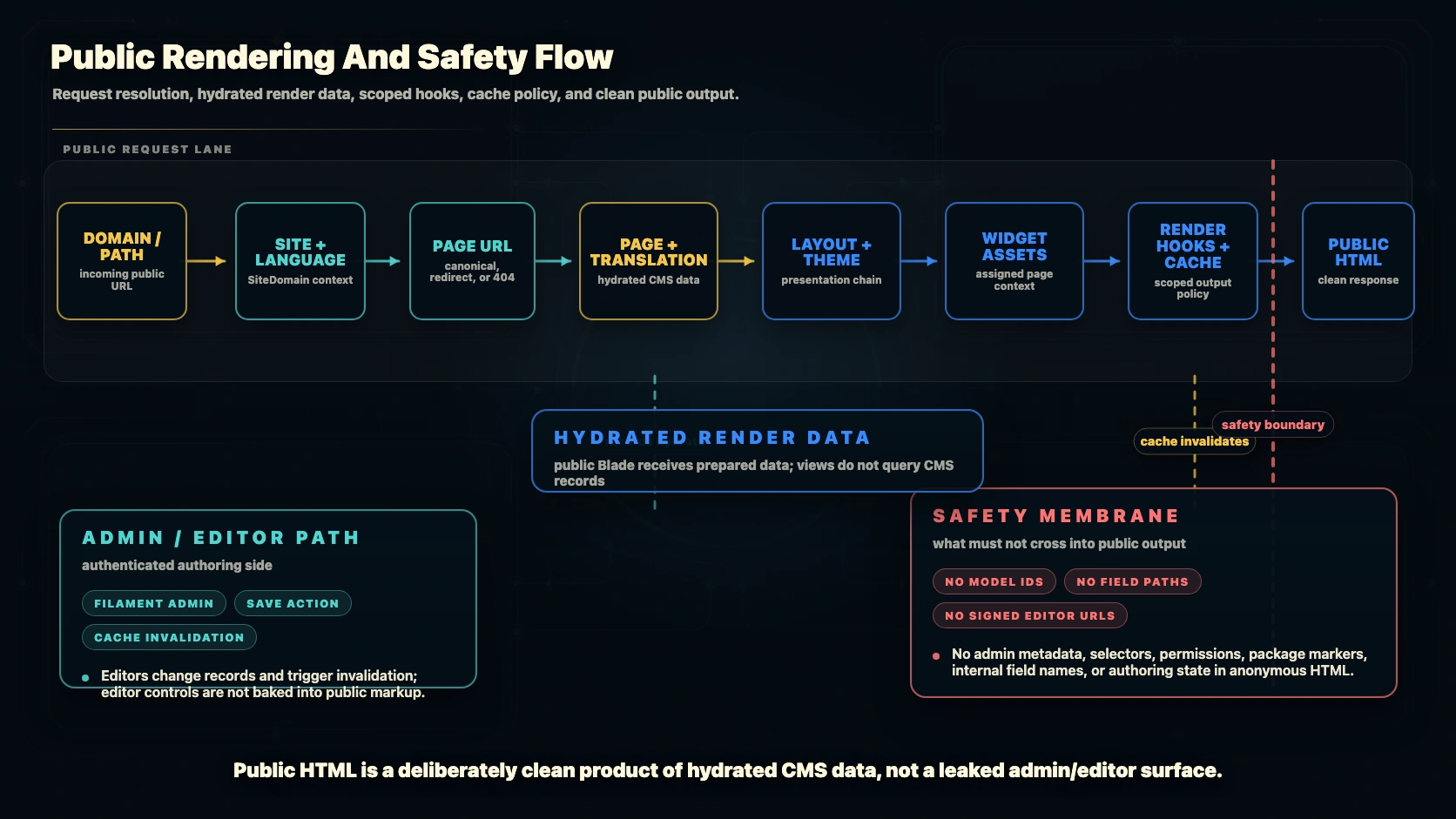
Capell can support previews and in-page authoring, but public visitors and crawlers should receive ordinary public HTML. Editor controls are an authenticated post-load concern, not something baked into cached markup.
Permissions, locks, revision controls, and editor-only tools stay behind authentication.
No editor controls, model IDs, admin URLs, field paths, internal selectors, signed editor URLs, or package markers.
The same clean markup works for CDNs, crawlers, anonymous visitors, and authenticated admins.
Use this visual when you want to see where content records, layout data, render preparation, cache, and public HTML meet. It belongs in the platform map because the rendering boundary is an engineering decision, not a homepage slogan.
Capell is content-first. Editors compose pages from approved records, sections, widgets, and layouts while developers keep public rendering predictable, testable, and fast.
Content hierarchy, canonical URLs, aliases, and redirect history stay visible.
Approved containers and widget assets create responsive pages without copied markup.
Static HTML, render-data caching, chrome-lite Livewire navigation, URL caches, and lazy client behaviour are part of the rendering contract.
Capell packages should be grouped by the problem they solve, not by vague plugin categories. That keeps install decisions legible as the marketplace grows.
Editor packages add approvals, previews, scheduling, translations, and rollback without changing public delivery rules.
Discovery packages keep metadata, sitemaps, robots, search, and cache health near content records.
Interaction packages add controlled visitor workflows and account-aware paths.
Operations packages make cache, health, deployment, redirects, and upgrade work visible.
Roadmap governance is part of the product story. Public pages should not blur shipped CMS capability, active package work, research, and future ideas.
If Capell looks like the right shape, start with the install path. If you are still comparing options, use the feature and extension pages to test fit before adopting packages.
Use the fit matrix and feature catalogue to decide whether Capell belongs in this project.
Install Core, Admin, Frontend, Layout Builder, and a theme before adding specialist packages.
Choose packages by install impact, support path, and the job they own.
Check cache, redirects, package health, and roadmap state as part of the same CMS workflow.
Capell learning journey
Guides for evaluating, planning, and operating Capell.
Fit, architecture, content model, and output quality.