
Laravel Cloud deployments

Deploy Capell on Laravel Cloud.

Use this page when the deployment question becomes practical: who owns the repository, who pays Laravel Cloud, what Capell creates, and how the first running instance registers back to the account.

Capell should not pretend to be the infrastructure provider. Laravel Cloud is the deployment platform; Capell is the product layer that makes the handoff understandable, repeatable, and visible after launch.

User-owned Laravel Cloud organisation Capell-guided source and token setup Status, retry, and deletion controls
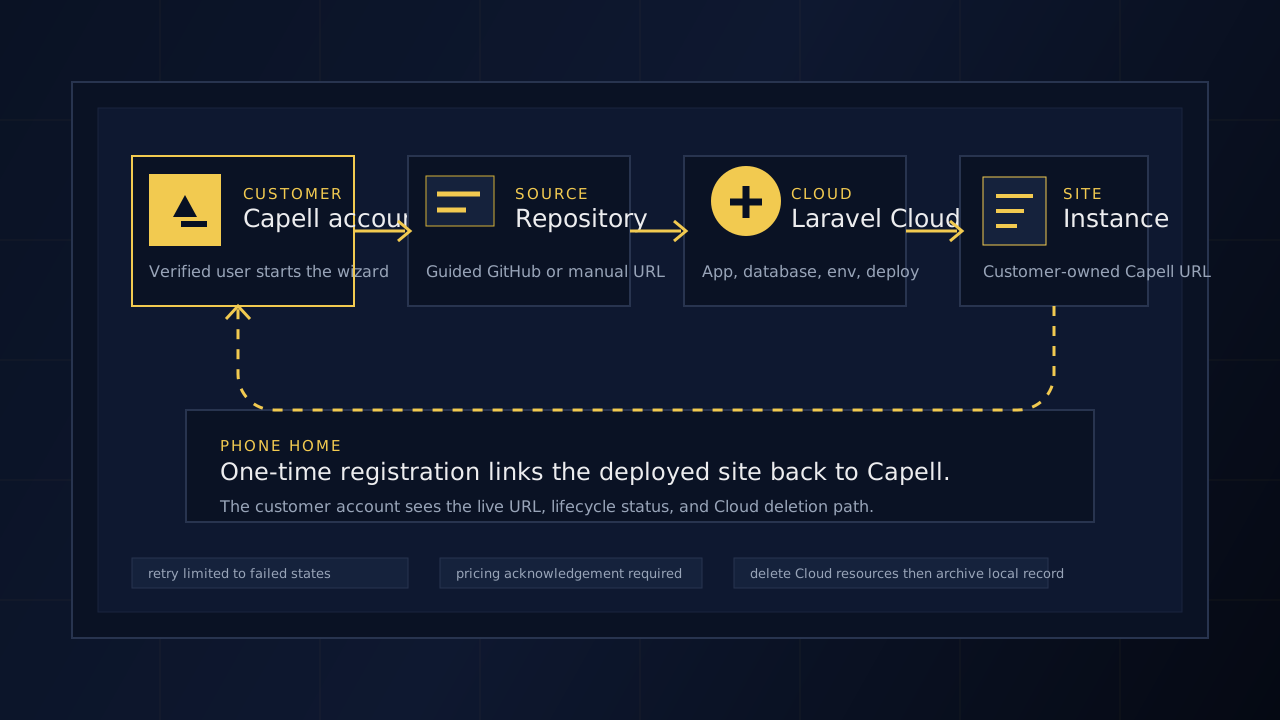
Diagram · Laravel Cloud handoff

The deployment page now leads with the ownership path: source, Laravel Cloud resources, first deployment, and instance registration back to Capell.

Cloud handoff
Integration story

Show the integration as a handoff between Capell and Laravel Cloud.

People searching for a Laravel Cloud deployment path need more than a launch button. The page should answer what is connected, what is created, who owns it, and what remains visible if provisioning fails.

Laravel Cloud

Trusted deployment platform.

Laravel Cloud provides the application, environment, deployment, database, usage, and billing surfaces. Capell links to those concepts instead of hiding them.

View Laravel Cloud
Capell

Guided CMS launch layer.

Capell prepares source, verifies the Cloud token, queues provisioning, tracks deployment events, registers the live instance, and keeps retry or deletion controls in the account.

Review account
Deployment flow

From source repository to running Capell instance.

Keep the deploy page focused on the job: choose source mode, verify the Laravel Cloud connection, acknowledge billing, provision resources, and confirm the deployed instance has registered back to Capell.

01 / Source

Choose guided or manual source.

Guided GitHub setup lowers friction. Manual repository input keeps permissions tighter for teams that want least access.

02 / Cloud

Verify the Cloud token.

Capell tests the Laravel Cloud token and organisation before it allows provisioning to continue.

03 / Launch

Provision, deploy, and register.

Capell creates the Cloud resources, starts deployment, then links the live instance back to the verified account.

Capell Cloud deployment flow showing account setup, source repository, Laravel Cloud, deployed Capell instance, and registration heartbeat.
Diagram · Laravel Cloud handoff

The deployment page now leads with the ownership path: source, Laravel Cloud resources, first deployment, and instance registration back to Capell.

Trust points

Answer the risk questions before the user creates billable resources.

The page should be searchable for deployment intent and useful for decision-stage readers. It should make clear that Capell guides setup while the user keeps ownership of Laravel Cloud and the source repository.

Ownership The user owns Cloud. The Laravel Cloud organisation, billing relationship, source repository, production credentials, and environment choices stay with the Capell user.
Resources Creation is explicit. The wizard explains the Cloud application, environment, web compute, database, environment variables, and first deployment before launch.
Failure Retries are deliberate. Failed provisioning can be retried from a known state with limits, status history, and enough context to avoid duplicate resource creation.
Deletion Removal is louder. Deletion removes Laravel Cloud resources first, archives the Capell record, and clears the encrypted per-instance token after confirmation.
Next steps

Move from deployment planning into account and operations.

Operations Read operations Plan what happens after launch: cache, redirects, package upgrades, health checks, and maintenance ownership. Operations